
Choose the look. Let Colourlab do the technical work.
Getting footage to look the way you imagined can involve complex adjustments, elaborate node structures and hours of trial and error. Colourlab brings those tasks into a simpler workflow.
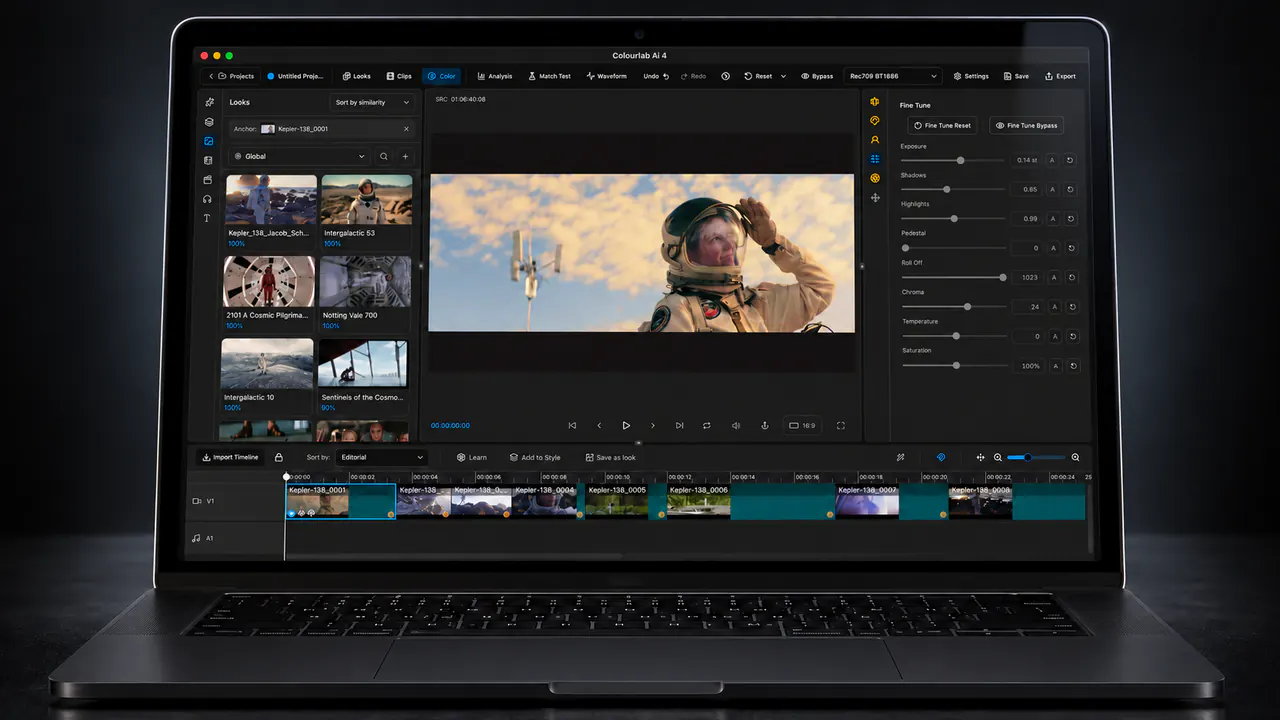
Start with your footage. Choose a reference or explore the look library. Let AI handle the initial balancing and matching, then refine the result to your taste.
Built for professional colourists and now accessible to anyone working with moving images, Colourlab helps newcomers start creating and experienced colourists reduce repetitive work.
A balanced starting point. One click.
Auto Balance adjusts exposure, white balance, contrast and saturation. Spend less time correcting the image before shaping its appearance.
See a look you love? Start there.
Use your own reference images or explore a growing library. AI matching translates the reference into a starting point for your footage and helps carry an aesthetic across shots.
Refine the result, save your looks and share them with others.
Direct your workflow through Claude.
Connect Claude through MCP and use natural language to direct supported operations. Local Colourlab tools analyse and process the images while the assistant coordinates the workflow.
Cinematic appearance, built in.
Astra Film combines film colour, grain, lens simulation, halation and spatial effects in a real-time system. Develop the character of the image in the same application you use to balance and match it.
Connected to your edit.
Bring your sequence into Colourlab, develop the grade and return to your editing workflow.
| Editor | Current connection |
|---|---|
| DaVinci Resolve Studio | Direct Fetch & Push through the API |
| DaVinci Resolve Free | OTIO with rendered media |
| Adobe Premiere Pro | OTIO; direct link planned |
| Final Cut Pro | XML; direct link planned |
| Avid Media Composer | OTIO |
More of the pipeline, included.
Colourlab Ai connects perceptual analysis, color management, matching and finishing in one application. The complete subscription includes Look Designer, Cine IS, Astra and all premium Astra film profiles, plus growing look libraries and user-shared looks through Houston.
Standalone Skin and Fine-Tune plug-ins and mobile applications are coming soon. Skin processing and Fine-Tune are already available inside Colourlab Ai. Filmlab Ai is licensed separately.
Built for Apple silicon.
| Requirement | Minimum |
|---|---|
| Operating system | macOS 14 |
| Processor | Any Apple M-series processor |
| Screen resolution | 1920 × 1080 |
Windows and RAW media support are coming soon. The current application supports a broad range of non-RAW media formats.
Choose your licence.
| Option | Price |
|---|---|
| Monthly subscription | $49/month |
| Annual subscription | $399/year |
| Perpetual licence | $799 |
The perpetual licence includes free updates and one free major-version upgrade. Start with a 14-day trial through Houston.
Frequently asked questions
Do I need to be a professional colourist?
No. Auto Balance, reference matching and integrated film emulation help you get started without mastering a complex workflow first. You choose the creative direction and refine the result.
Is it useful for experienced colourists?
Yes. Automate repetitive balancing and matching, establish a coherent starting point and spend more time on the creative grade.
Does it replace my editor?
Colourlab works alongside your editor. Exchange a sequence, grade it and return through the supported workflow.
Can I use my own reference image?
Yes. Use your own references or select from the look library.
Do I need Claude?
No. Claude is an additional way to operate supported tools. The Colourlab interface provides the grading workflow directly.
Can I use RAW footage?
Not yet. RAW support is planned.
Can I use included tools in Resolve?
Astra and Cine IS are available as external OFX plug-ins. Standalone Skin and Fine-Tune plug-ins are coming soon.
Where do I start?
Follow Your First Grade or open training and documentation inside Houston.